

Navigating Oracle ULA Certification and VMware Containment Risks
An Unlimited License Agreement (ULA) is a common contractual vehicle for large organizations deploying enterprise databases. For a fixed, multi-year term (typically three to five years), an organization can deploy as many licenses of specified database editions and options as it requires without paying additional licensing fees.
While a ULA provides operational flexibility during the deployment phase, the real challenge begins at the end of the term: the exit (or Certification) phase.
When a ULA expires, you must document and declare your software deployments. Oracle then reviews these deployments and grants you perpetual licenses matching your active footprint, allowing you to transition out of the ULA while paying ongoing support fees.
However, when ULA database workloads run in virtualized environments—specifically VMware vSphere—the certification process can become complex.
Managing virtualization containment risks and establishing accurate technical evidence are critical steps to achieving a successful ULA exit.
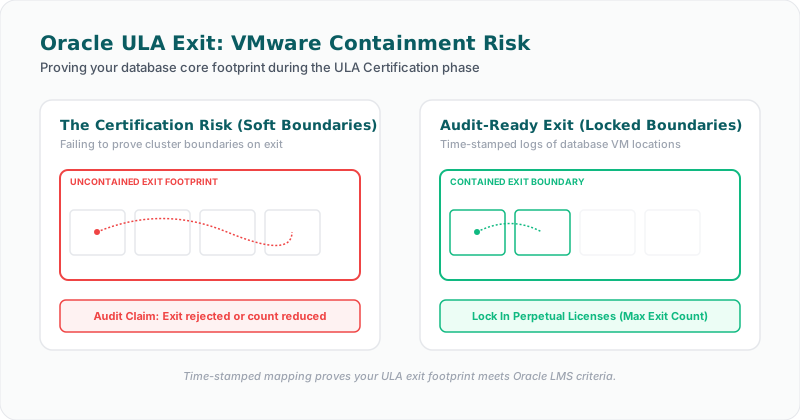
The VMware Cluster Challenge in ULA Certification
During a ULA term, many organizations migrate their databases onto virtualized infrastructure to maximize hardware utilization and simplify systems management. Under VMware environments, this often involves clustering physical ESXi hosts.
Because virtual machines (VMs) can migrate dynamically between hosts inside a cluster, analyzing license requirements requires looking at the physical hardware boundaries of the hypervisor.
This dynamic environment introduces specific risks when preparing for ULA certification:
1. The "Installed and Running" Definition
Oracle’s contracts define a processor license based on where the database software is "installed and/or running."
Under a ULA, organizations sometimes attempt to maximize their exit numbers by hosting database VMs on their largest, highest-core VMware clusters right before the certification date. The intention is to lock in a large number of perpetual licenses upon ULA exit.
However, during ULA certification reviews, Oracle’s Global Licensing and Advisory Services (GLAS) team evaluates these declarations closely. They will request evidence to verify:
* Whether the database instances were actively deployed and running on those hosts.
* Whether databases were installed merely as empty configurations or were part of active systems.
* The exact physical hosts where VMs resided during the certification period.
If an organization declares a massive cluster but only has a few database VMs running on a subset of hosts, Oracle may challenge the certification of the entire cluster cores. Having clear technical evidence of active usage helps address these inquiries.
2. VMware Containment Boundaries
Virtual machines are prone to configuration changes and host migration. If an Oracle VM migrates to a host outside the contractually designated ULA scope (such as a cluster in an unauthorized geographical territory or an ineligible subsidiary's host), it can trigger compliance risks.
Verifying that database workloads have remained within ULA-eligible virtualization boundaries throughout the term is essential for managing your certification scope.
3. Non-ULA Features and Options
A ULA does not always cover every database option or pack. For example, your ULA might grant unlimited use of Oracle Database Enterprise Edition and Partitioning, but exclude Advanced Security or the Tuning Pack.
During ULA certification, auditors evaluate database system tables to ensure no non-ULA options have been triggered. If database administrators (DBAs) accidentally enable an unlicensed feature, it can lead to unexpected licensing claims during the certification review.
Best Practices for Managing ULA Certification
Navigating the ULA exit process requires a structured approach to data collection and verification. Organizations should establish an internal readiness process well before the ULA expiration date:
Perform a Pre-Certification Audit (12 Months Prior)
Do not wait for the certification deadline to start cataloging deployments. At least a year before the ULA term ends, establish an internal baseline:
* Identify all active database instances, versions, and editions.
* Query database system views (such as DBA_FEATURE_USAGE_STATISTICS) to verify that only ULA-covered options are enabled.
* Deactivate any non-ULA options that are not required or licensed.
Verify VMware Topology and Containment rules
Review your virtualized infrastructure to ensure boundaries are documented and maintained:
* Use VMware DRS (Distributed Resource Scheduler) rules to confine database VMs to designated hosts.
* Document vCenter structures, ESXi host core topologies, and cluster definitions.
* Export and archive hypervisor logs to provide a clear record of VM movements.
Establish a Technical Evidence Archive
Gather and catalog configuration telemetry, database query results, and virtualization maps. This documentation forms the technical evidence chain needed to support your certification declaration, providing a factual basis for discussions with the vendor.
The Role of Collaboration Between Teams
A successful ULA certification requires alignment between Software Asset Managers (SAM), Database Administrators (DBAs), and infrastructure teams.
* SAM Managers must translate ULA contract terms, territory restrictions, and covered options into operational guidelines.
* DBAs must verify that database settings and feature usage align with those guidelines, preventing the activation of non-ULA packs.
* Infrastructure Teams must configure virtualization environments to maintain containment boundaries and ensure host migrations remain within ULA limits.
When these teams share access to a single compliance dashboard that maps database configurations to hypervisor topologies, they can manage changes collaboratively, preventing last-minute certification surprises.
Key Takeaway
> [!IMPORTANT]
> Key Takeaway for ULA Certification
> * Certification requires Proof: Oracle ULA exits rely on verifying your active database deployments and hardware configurations.
> * Virtualization Adds Complexity: Declaring virtualized deployments requires mapping clusters, hosts, and VM migration paths.
> * Non-ULA Options Introduce Risk: Unlicensed options not covered by the ULA must be identified and addressed before the certification date.
> * Proactive Planning is Vital: Organizations should begin verifying their technical evidence baseline at least 12 months before ULA expiration.
How Licencify Helps
Licencify is a technical evidence platform built to support database license management and ULA exit readiness. By automatically connecting database configurations, virtual machine placements, and ESXi host architectures, Licencify helps organizations build a repeatable evidence chain. Licencify enables SAM, DBA, and infrastructure teams to track deployments continuously, identify non-ULA options early, and compile verification reports, supporting a more reliable ULA certification analysis.
Disclaimer
This article is for informational purposes only and does not constitute legal or licensing advice.
Suggested Internal Links
1. Why Oracle Audit Readiness Starts With Technical Evidence — Not Spreadsheets – The core pillar post on why system telemetry is the foundation of database compliance.
2. How Infrastructure Mapping Impacts Oracle Licensing on VMware – A deep dive into how VMware host and cluster mappings influence database licensing metrics.
3. The Role of Historical Snapshots in Database Compliance Audits – Understanding why maintaining historical records of VM movement and options is crucial.
4. Why Database-Aware Discovery Outperforms File-Scanning SAM Tools – How database-specific telemetry detects option triggers that file scanners miss.
5. Understanding DBA_FEATURE_USAGE_STATISTICS in Oracle Database Audits – Technical analysis of the system view used to track database features and options.
FAQ Section
Suggested Schema Types
* BlogPosting
* FAQPage
Frequently Asked Questions
#### 1. What does ULA certification involve?
ULA certification is the process of declaring your active Oracle software deployments at the end of an Unlimited License Agreement. The customer submits a formal declaration detailing their database instances, physical core configurations, and options, which Oracle reviews to establish the customer's permanent perpetual license entitlements.
#### 2. Why do VMware clusters create risks during ULA certification?
Oracle’s licensing guidelines treat VMware as a soft partitioning technology, often requiring licensing for all cores in a cluster. If database VMs reside on large clusters, certifying those clusters requires proving that databases were installed and active. Disagreements can arise regarding which cores qualify for certification.
#### 3. How do non-ULA options impact ULA certification?
If your ULA does not cover specific options (like Advanced Security or Tuning Packs) and they are activated during the term, Oracle can audit those features and demand separate license purchases, which can complicate the certification exit process.
#### 4. When should an organization begin preparing for ULA certification?
Preparations should begin at least 12 months before ULA expiration. This allows time to perform internal inventory checks, audit active features, isolate workloads on dedicated clusters, and gather infrastructure telemetry.
#### 5. Does a ULA prevent Oracle audits during the agreement term?
No. A ULA grants unlimited deployment rights for specified programs, but it does not prevent Oracle from auditing your environment to check for non-ULA options, territory compliance, or entity usage rights.
Visual Concepts and Image-Generation Prompts
1. Hero Image: ULA Exit Dashboard
* Image Title: ULA Certification Mapping
* Short Description: A professional B2B SaaS interface illustration displaying database counts, ULA scopes, and cluster metrics aligning for certification.
* Suggested Placement: Below the main blog title.
* Image-Generation Prompt:
> Create a professional B2B SaaS illustration for Licencify using brand colors #244677 and #b2b8bf. Show a clean, minimal dashboard overview tracking database deployments, virtualization clusters, and ULA contract scopes. Use thin gridlines, clear graphics, generous white space, and a calm compliance atmosphere. Include "Insert official Licencify logo here." Do not use cartoon style.
* Suggested Alt Text for SEO: Oracle ULA certification dashboard mapping database deployments to license scopes.
* Suggested Filename: oracle-ula-certification-mapping-dashboard.webp
2. Section Image: Virtualization Scope Boundary
* Image Title: ULA Virtualization Boundary Check
* Short Description: A clean network topology diagram illustrating VMware clusters inside and outside a ULA licensing boundary.
* Suggested Placement: Within the section "The VMware Cluster Challenge in ULA Certification".
* Image-Generation Prompt:
> A professional B2B SaaS diagram in a clean, minimal style using brand colors #244677 and #b2b8bf. Show two logical cluster shapes: one labeled inside ULA scope, and another labeled outside ULA scope, connected by VM migration pathways. Modern technical layout, thin lines, and generous white space.
* Suggested Alt Text for SEO: Virtualization boundaries mapping ULA compliant cluster zones.
* Suggested Filename: ula-virtualization-boundary-containment.webp
3. Section Image: ULA Exit Pre-Audit Timeline
* Image Title: Pre-Certification Timeline
* Short Description: A visual timeline displaying the 12-month pre-certification checklist steps (Inventory, Cleanup, Isolation, Verification).
* Suggested Placement: Within the section "Best Practices for Managing ULA Certification".
* Image-Generation Prompt:
> A modern, professional B2B SaaS timeline graphic using brand colors #244677 and #b2b8bf. Show four milestone steps along a clean, horizontal timeline representing ULA exit planning stages: Inventory check, option optimization, cluster lockdown, and final data verification. Generous white space, clear icons, minimal design.
* Suggested Alt Text for SEO: ULA certification readiness timeline displaying 12-month checklist milestones.
* Suggested Filename: ula-exit-readiness-timeline.webp
LinkedIn Post Snippets
Snippet 1
> Preparing to certify and exit an Oracle ULA? The transition from unlimited deployments to fixed perpetual licenses requires precise technical evidence. If your databases run on VMware, Oracle will evaluate your cluster configurations and host topology closely.
>
> Learn how to manage virtualization containment risks before your certification date: [Link to blog post]
>
> #OracleULA #ULACertification #ITAM #EnterpriseIT #Virtualization #Licencify
Snippet 2
> A common ULA pitfall: assuming "unlimited" means "no audit risk." While a ULA covers specified products, options not covered by the agreement remain compliance risks. DBAs accidentally activating non-ULA options can result in major unexpected liabilities during certification.
>
> Discover why proactive feature auditing is essential for a successful ULA exit: [Link to blog post]
>
> #SoftwareAssetManagement #DatabaseLicensing #DBA #RiskMitigation #Licencify
Snippet 3
> Exiting an Oracle ULA is a data-driven process. To defend your numbers, you must provide verifiable proof of your physical hardware hosts, vCenter environments, and VM placements. Waiting until the ULA expires to compile this history introduces substantial risk.
>
> Read why ULA exit readiness starts with establishing a technical evidence chain: [Link to blog post]
>
> #CIO #ITInfrastructure #DatabaseOperations #SaaSCompliance #Licencify
Final Publication Checklist
- [x] Target Audience Alignment: Addresses SAM leads, infrastructure architects, and IT executives.
- [x] Keywords Integrated: Natural usage of "Oracle ULA certification", "Oracle ULA VMware", "VMware containment", "Oracle audit readiness", and others.
- [x] Careful Phrasing: Employs phrases like "may indicate risk" and "supports a more reliable licensing analysis".
- [x] No Legal Advice: Includes the required legal disclaimer and avoids absolute contractual claims.
- [x] Internal Linking: Links back to the pillar article and references VMware, Discovery, and Historical Snapshot posts.
- [x] Licencify Positioning: Positioned as a technical database license management solution providing deployment telemetry.
- [x] Aesthetic Visual Concepts: Proposes minimal SaaS illustrations in brand colors with logo placeholder notes.
Facing an active Oracle or SQL Server Audit?
Verify database parameters and virtualization host boundaries locally without raw data uploads. Download our secure gateway.