

Oracle Database SE2: Understanding the 16-Thread Hard Limit
When Oracle introduced Standard Edition 2 (SE2) to replace Standard Edition (SE) and Standard Edition One (SE1), they did not just change the motherboard socket rules. They also introduced a software-enforced performance governor: a hard limit of 16 concurrent CPU threads per database instance.
Many database administrators (DBAs) and IT managers are unaware of this software throttle. As a result, they waste expensive hardware resources and over-allocate virtual CPUs (vCPUs) in their VMware or cloud environments without gaining any performance benefits.
Here is how the 16-thread limit works, how it affects your workloads, and how to optimize your setup.
🛑 The 16-Thread Resource Manager Throttle
Oracle SE2 has a built-in, un-bypassable setting that utilizes the database's internal Resource Manager to restrict CPU usage.
Regardless of how many CPU cores or sockets your physical server or virtual machine has:
* A single Oracle SE2 database instance will never use more than 16 concurrent CPU threads to process user queries.
* If your database is hit with a high volume of transactions, any requests requiring a 17th or 18th thread will be queued, waiting for one of the active 16 threads to free up.
* If you deploy Oracle Real Application Clusters (RAC) using SE2 (available only up to version 18c), the limit is even tighter: 8 threads per instance across a maximum of two nodes (making a total of 16 threads across the cluster).
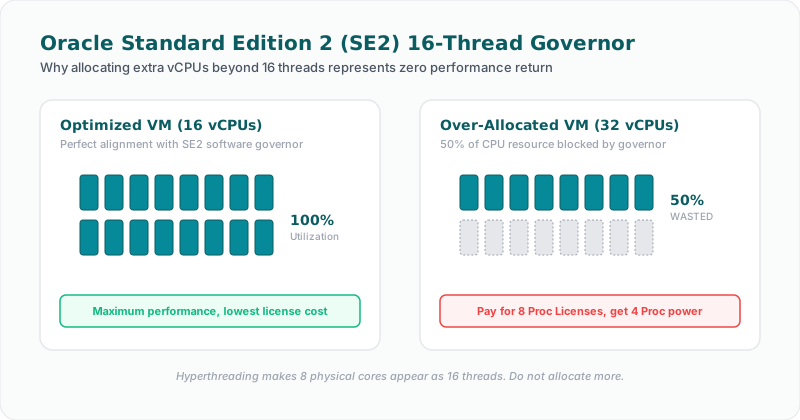
⚠️ The Virtualization Waste: Over-Allocated vCPUs
A common mistake in VMware, AWS, or Azure deployments is allocating large virtual instances to Oracle SE2.
Suppose a DBA notices database slowdowns and decides to scale a database VM on VMware vSphere from 16 vCPUs to 32 vCPUs.
1. The Performance Reality: The database will not run faster. The internal SE2 resource manager will still throttle execution to 16 threads, leaving the additional 16 vCPUs completely unused by the database engine.
2. The Cloud Licensing Cost: In public clouds like AWS or Azure, Oracle licensing rules state that 1 socket equivalent is equal to 4 vCPUs. Running a 32-vCPU VM requires you to have 8 Processor licenses of SE2. If you only need 16 vCPUs to hit the thread ceiling, you are paying for twice as many licenses as the database engine can actually use!
Allocating more than 16 vCPUs (or 8 cores with hyperthreading) to a single Oracle SE2 instance is quite literally throwing money away.
🛠️ How to Optimize Around the Thread Limit
If your database workloads are outgrowing the 16-thread limit, you have three primary paths:
1. Right-Size Your Virtual Machines
Reduce your VM allocations to match the physical thread ceiling. Set your VMs to a maximum of 16 vCPUs (or 8 cores/16 threads). This frees up valuable CPU capacity on your hypervisor hosts for other workloads and reduces your cloud CPU consumption costs.
2. Consolidate via Multiple Database Instances
The 16-thread limit is enforced per database instance, not per physical server. If you have multiple independent applications, running them in separate SE2 database instances on the same physical server allows each instance to utilize up to 16 threads. (Note: The physical server itself must still respect the 2-socket motherboard limitation).
3. Upgrade to Enterprise Edition (EE)
If a single, massive workload requires more than 16 concurrent threads to process data efficiently, you must migrate to Oracle Enterprise Edition (EE). Enterprise Edition has no software-enforced thread limits, but it requires purchasing significantly more expensive EE licenses.
🚀 How Licencify Optimizes SE2 Environments
Without proper profiling, it is difficult to know if your databases are actively hitting the 16-thread ceiling or if they are over-provisioned.
Licencify provides deep database performance and compliance scanning:
* Thread Profile Monitoring: Tracks active database sessions and CPU thread utilization to identify if your SE2 instance is frequently queuing queries due to the 16-thread throttle.
* Virtual Resource Auditing: Scans hypervisors (VMware, Proxmox, Nutanix) and cloud providers (AWS, Azure) to identify VMs running SE2 that have been over-allocated with vCPUs.
* Optimization Recommendations: Automatically flags instances where you can safely downsize virtual resources to save licensing costs, or suggests instances that require an upgrade to Enterprise Edition due to persistent resource starvation.
Is your Oracle SE2 database running slowly despite having plenty of allocated CPUs? Let Licencify profile your database instances and identify resource bottlenecks.
Facing an active Oracle or SQL Server Audit?
Verify database parameters and virtualization host boundaries locally without raw data uploads. Download our secure gateway.