

How Infrastructure Mapping Impacts Oracle Licensing on VMware
Virtualizing enterprise workloads has been a standard infrastructure strategy for over two decades. Running Oracle Database on VMware vSphere offers obvious benefits: dynamic resource allocation, simplified server maintenance, high availability, and improved hardware utilization. Yet, despite these advantages, virtualization remains one of the most complex areas of database license management.
The complexity does not stem from technical limitations, but from how licensing policies interact with virtualized architectures. Many organizations find themselves caught in a compliance debate when preparing for audits or reviewing database estates.
To manage compliance risks and optimize hardware costs, organizations must look beyond database configuration. They must map their entire infrastructure topology, connecting virtual machines (VMs) to physical hosts, clusters, and vCenter management servers.
Why Virtualization Introduces Oracle Licensing Challenges
To understand why infrastructure mapping is critical, it is helpful to look at how Oracle’s licensing models are structured. For many enterprise deployments, Oracle Database is licensed under the Processor metric. The Processor metric is calculated based on the physical cores of the hardware on which the Oracle software is "installed and/or running."
In a traditional physical environment, calculation is straightforward. You count the physical sockets and cores on a single rack server, apply the core processor factor, and obtain the licensing requirement.
In a virtualized environment, this calculation becomes dynamic. Virtual machines do not run on fixed physical hardware; they are decoupled from the underlying servers. A database VM might run on ESXi Host A in the morning and migrate to ESXi Host B in the afternoon to optimize CPU performance.
Because VMs can migrate dynamically across physical servers, identifying where database software is "installed and/or running" requires mapping the entire cluster. Oracle’s licensing guidelines for virtualized environments emphasize physical core counts, maintaining that physical boundaries are what determine licensing obligations under their policies.
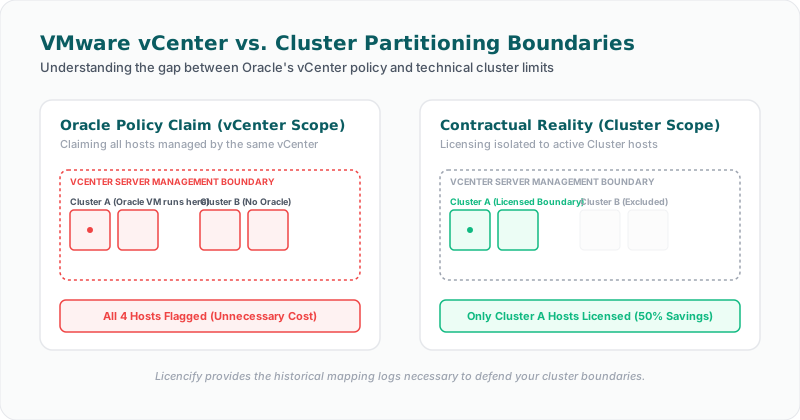
While contract terms (such as the Oracle Master Agreement or OLSA) focus on where software is installed and running, Oracle's public-facing sales policies and guidelines make virtualization licensing complex. Oracle's guidelines treat VMware as a "soft partitioning" technology, asserting that software is effectively installed across all hosts in a vCenter cluster or, in some policy views, across all clusters managed by a vCenter Server.
This contrast between contract definitions and sales policies creates a complex compliance landscape. To defend your IT budget and maintain audit readiness, you must establish clear, technical proof of where your database workloads are deployed.
The Infrastructure Data Points That Matter
Establishing control over virtualization licensing requires mapping and logging several infrastructure parameters. Relying on database queries alone is insufficient; you must collect telemetry from the hypervisor and management layers:
1. vCenter Cluster Configurations
A cluster is a logical grouping of physical ESXi hosts. In vSphere, clusters are used to pool CPU, memory, and storage resources. You must map which physical hosts belong to each cluster. This helps define the logical boundaries where a VM is configured to run and where it can potentially migrate during resource reallocation or host failures.
2. Physical Host CPU and Core Topology
For every physical ESXi host in a cluster running Oracle VMs, you must catalog:
* The number of physical CPU sockets.
* The CPU model and architecture (which determines the core processor factor).
* The total number of physical cores.
* Hyper-threading settings.
This data is essential because any processor-based license calculation is calculated from these physical host parameters.
3. Distributed Resource Scheduler (DRS) Configurations
VMware DRS automatically balances workloads across hosts in a cluster. If DRS is set to fully automated, vSphere can migrate an Oracle VM to another host without administrator intervention.
To manage compliance boundaries, teams often implement DRS Host Affinity Rules. These rules restrict virtual machines to a designated subset of ESXi hosts within a cluster. Mapping these rules provides evidence of logical containment, showing that Oracle VMs are restricted from migrating to unlicensed hosts.
4. Virtual Machine CPU Allocations
While Oracle Processor licensing is calculated based on physical host cores, you must still track virtual CPU (vCPU) allocations for each database VM. This data supports performance analysis and is required for calculating minimum user requirements under the Named User Plus (NUP) metric.
5. VM Migration History
Perhaps the most critical infrastructure evidence point is the VM migration history (vMotion logs). During an audit, you must demonstrate where database VMs have resided over time. If a VM migrated to a host outside your designated licensing boundary, even temporarily, it can impact your licensing analysis.
Why Database-Level Telemetry is Not Enough
A common mistake is assuming that running queries inside the database is sufficient to verify compliance. Database administrators (DBAs) can run queries to check database feature usage, options, and tablespaces. However, the database engine is unaware of the hypervisor layout.
A query against V$INSTANCE or V$LICENSE can tell you the database version and the virtual CPU allocation, but it cannot tell you:
* Which physical ESXi host the database is currently running on.
* How many physical cores are populated on that host.
* Whether the VM has migrated between different clusters in the last 12 months.
* Whether the cluster contains other physical hosts that lack Oracle licenses.
Without infrastructure mapping, there is a disconnect between the database engine and the physical hardware. Software Asset Managers (SAM) cannot accurately align contracts with deployments unless they can trace a path from the database instance, through the VM, to the physical cores of the host cluster.
Bridging the Gap Between SAM and Infrastructure Teams
Virtualization compliance issues often arise because of operational silos.
Infrastructure teams manage virtual environments to ensure performance, high availability, and hardware efficiency. They may add a physical host to a VMware cluster to handle workload peaks or upgrade ESXi hosts to newer CPU models.
However, if they make these adjustments without consulting the SAM team, they can unknowingly trigger massive licensing implications. Adding a host to a cluster where Oracle VMs reside can increase the licensing requirement for that environment under Oracle’s cluster-licensing policies.
Bridging this gap requires a shared technical view. When database administrators, infrastructure engineers, and SAM teams share access to a single source of truth that connects database telemetry with hypervisor mapping, they can coordinate decisions.
Infrastructure teams can verify the licensing impact before migrating VMs or modifying clusters, while SAM managers can maintain continuous visibility into the actual deployment topology, replacing guesswork with verified data.
Key Takeaway
Key Takeaway for Virtualized Database Environments
* Infrastructure Context is Vital: Database compliance analysis is incomplete without mapping the underlying virtual and physical infrastructure.
* Track Dynamic Movements: Dynamic VM migrations (vMotion) and DRS rules must be logged continuously to demonstrate containment.
* Silos Introduce Risk: Upgrades or cluster changes made by infrastructure teams without SAM visibility can create significant licensing discrepancies.
* Verifiable Evidence is Key: Defending virtualization environments during reviews requires a repeatable evidence chain connecting databases, virtual machines, and physical hosts.
How Licencify Helps
Licencify is a technical evidence platform designed to bridge the gap between database telemetry and infrastructure layers. By automatically connecting vCenter virtualization mapping, ESXi host core topologies, and database usage data, Licencify helps organizations build a repeatable technical evidence chain. Licencify enables SAM, DBA, and infrastructure teams to collaborate around a shared view of their virtualized estate, supporting repeatable reporting and audit readiness.
Disclaimer
This article is for informational purposes only and does not constitute legal or licensing advice.
Suggested Internal Links
1. Why Oracle Audit Readiness Starts With Technical Evidence — Not Spreadsheets – Our pillar article outlining why raw system data is the foundation of license compliance.
2. Navigating Oracle ULA Certification and VMware Containment Risks – A strategic guide to validating deployments before certifying your Unlimited License Agreement.
3. The Role of Historical Snapshots in Database Compliance Audits – Learn why tracking VM migrations and configuration changes over time is essential.
4. Why Database-Aware Discovery Outperforms File-Scanning SAM Tools – How database-specific discovery captures features that general-purpose tools miss.
5. Understanding DBA_FEATURE_USAGE_STATISTICS in Oracle Database Audits – A technical breakdown of the database views that track active options and packs.
FAQ Section
Suggested Schema Types
* BlogPosting
* FAQPage
Frequently Asked Questions
#### 1. Why does VMware virtualization complicate Oracle licensing?
Oracle's licensing model is based on physical cores, while VMware virtualizes resources and allows virtual machines to migrate dynamically across hosts. Oracle's sales policy treats VMware as a "soft partitioning" method and often asserts that all hosts in a cluster must be licensed. This creates complexity, requiring organizations to track exact VM movements and cluster boundaries to manage their licensing exposure.
#### 2. What are DRS Host Affinity Rules, and how do they impact licensing analysis?
Distributed Resource Scheduler (DRS) Host Affinity Rules are configurations in VMware that restrict specific virtual machines to designated ESXi hosts. In licensing analysis, these rules support logical containment, showing that Oracle VMs are restricted from running on unlicensed hosts within a cluster.
#### 3. Why can't I rely on database queries alone to analyze VMware licensing?
Database queries can only report settings inside the database instance itself, such as vCPU allocation. They cannot detect the physical ESXi host the VM is running on, the host's physical core count, or cluster-level migration logs. Virtualization compliance requires hypervisor-level metadata.
#### 4. How does adding a host to a VMware cluster affect database licensing requirements?
Under Oracle's cluster-level licensing guidelines, adding a host to a cluster where Oracle VMs reside can expand the licensing requirement to include the physical cores of the new host. Infrastructure modifications should always be reviewed for licensing impact beforehand.
#### 5. Does using affinity rules guarantee that Oracle will accept my licensing boundaries?
No. While affinity rules and containment strategies support logical boundaries and internal risk management, Oracle's official sales policy remains restrictive regarding VMware. Any virtualization containment strategy should be validated through your contracts and reviewed by licensing experts.
Facing an active Oracle or SQL Server Audit?
Verify database parameters and virtualization host boundaries locally without raw data uploads. Download our secure gateway.