

Licensing Oracle Database on AWS RDS: SE2 vs. EE Cloud Rules
Migrating database workloads to Amazon Web Services (AWS) Relational Database Service (RDS) offers massive management benefits. AWS handles automated backups, patching, and scaling, leaving your DBAs to focus on application logic.
However, when you "Bring Your Own License" (BYOL) to AWS RDS, the licensing rules change dramatically.
If you fail to understand how Oracle defines cloud vCPU-to-core mappings or hardware limits, you can easily end up under-licensed or paying for software capacity you cannot use.
Here is a breakdown of the rules for Standard Edition 2 (SE2) and Enterprise Edition (EE) on AWS RDS.
☁️ The Cloud vCPU Licensing Rule
In an on-premises data center, Oracle licensing is based on physical processor cores and sockets.
In authorized public clouds (AWS and Azure), Oracle does not have access to the physical hosts. Therefore, they license by virtual CPU (vCPU) counts:
* With Hyperthreading Enabled: 2 vCPUs are equivalent to 1 Oracle Processor License.
* Without Hyperthreading Enabled: 1 vCPU is equivalent to 1 Oracle Processor License.
For Enterprise Edition (EE), this is a linear mapping. If you deploy an AWS RDS instance (like db.m5.2xlarge) that has 8 vCPUs with hyperthreading, you must allocate 4 Enterprise Edition Processor licenses to that instance.
⚠️ The Standard Edition 2 (SE2) Socket Trap in AWS
On-premises, SE2 is licensed per physical socket, with a maximum limit of a 2-socket motherboard.
In the cloud, where sockets do not exist, Oracle translates sockets into vCPU caps:
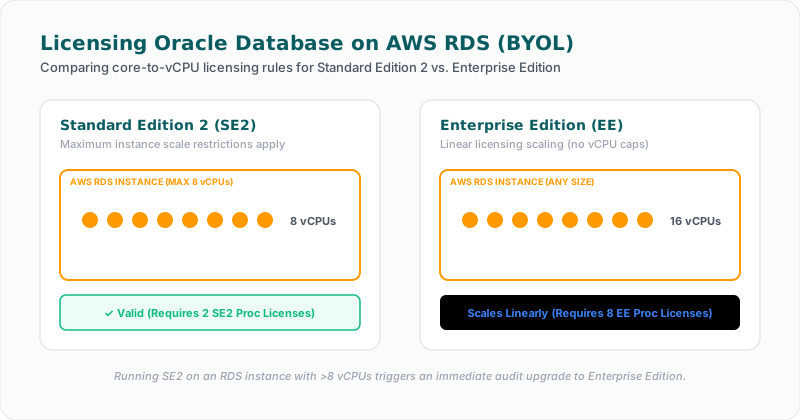
* Every 4 vCPUs allocated to an instance is counted as 1 socket equivalent for SE2.
* Since SE2 has a maximum limit of 2 sockets per server, you are only allowed to run SE2 on cloud instances with a maximum of 8 vCPUs.
If you spin up an AWS RDS instance with 16 vCPUs (such as db.m5.4xlarge) and apply your SE2 BYOL licenses, you are in direct violation of Oracle’s licensing rules.
An auditor will reject your SE2 licenses for that instance and force you to buy Enterprise Edition licenses for all 16 vCPUs—costing you hundreds of thousands of dollars in unexpected penalties.
The 16-Thread Hard Limit
To make matters worse, the Oracle SE2 engine includes a built-in software throttle that limits the database to 16 concurrent threads. Even if you deploy on an instance with 16 vCPUs, the database will only use 16 threads, but you will be charged for the full hardware capacity.
📊 AWS RDS: License Included vs. BYOL
AWS offers two licensing models for Oracle Database on RDS:
1. License Included (Standard Edition 2 only)
Under this model, the cost of the Oracle software license is bundled directly into the hourly AWS instance rate.
* Pros: Excellent for short-term workloads, dev/test environments, and dynamic scaling. You have zero audit risk since AWS manages the licensing relationship with Oracle.
* Cons: Over time, the license-included premium is significantly more expensive than running BYOL with existing perpetual licenses.
2. Bring Your Own License (BYOL)
You apply your existing perpetual Oracle licenses to the AWS RDS instance.
* Pros: Highly cost-effective if you have unused Oracle licenses or active support contracts.
* Cons: You assume 100% of the audit risk. You must ensure your vCPU allocations match your entitlements.
🚀 How Licencify Optimizes AWS RDS Licensing
Manually mapping cloud instances to Oracle processor licenses is tedious and dynamic cloud auto-scaling can quickly lead to compliance drift.
Licencify automates your AWS database optimization:
* Cloud API Connectors: Integrates directly with your AWS accounts to scan all RDS and EC2 instances running Oracle.
* vCPU-to-License Mapping: Computes active vCPU allocations and flags instances exceeding the 8-vCPU limit for Standard Edition 2.
* BYOL vs. License Included Analyzer: Compares active instance runtimes and licenses to advise when it is cheaper to migrate between BYOL and License Included models.
* Dynamic Alerting: Instantly alerts your cloud team if an RDS instance is resized to a non-compliant core count.
Are you migrating Oracle databases to AWS RDS? Let Licencify audit your cloud templates and prevent unexpected cloud audit penalties.
Facing an active Oracle or SQL Server Audit?
Verify database parameters and virtualization host boundaries locally without raw data uploads. Download our secure gateway.