

SQL Server on VMware: Host-Level Core Licensing vs. VM-Level Licensing
Deploying Microsoft SQL Server on VMware is the industry standard for optimizing resource utilization. However, mapping SQL Server core licensing rules to a virtualized cluster can be incredibly confusing. Move a virtual machine (VM) to a new host, or adjust its vCPU allocation, and you could inadvertently trigger massive compliance gaps.
When licensing SQL Server in virtual environments, you have two primary licensing paths: Licensing Individual Virtual Machines or Licensing for Maximum Virtualization (Host-Level).
Understanding which model fits your architecture is key to avoiding over-licensing while remaining 100% compliant.
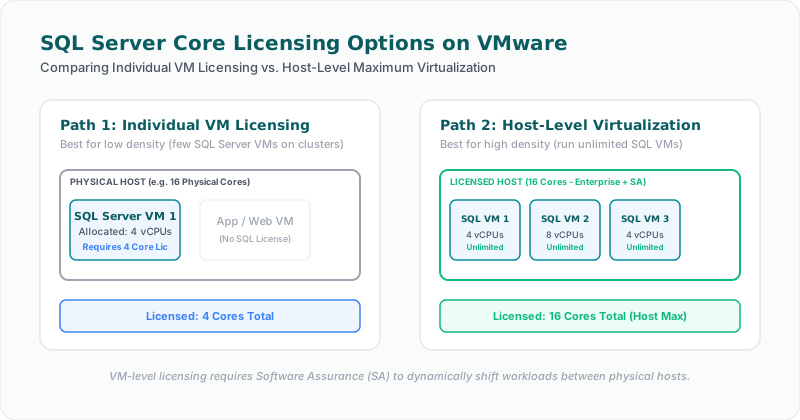
Path 1: Licensing Individual VMs (Per-Core Model)
For organizations running a small number of SQL Server VMs on a shared VMware cluster, licensing individual virtual machines is often the most cost-effective approach.
Under this model, you only license the virtual cores (vCPUs) allocated to each specific SQL Server VM.
#### The Rules:
* Minimum Core Requirement: You must license a minimum of 4 virtual cores per VM, even if the VM is only allocated 1 or 2 vCPUs. If you deploy a 2-core SQL Server VM, you are still billed for 4 cores.
* License Mapping: You must count the number of vCPUs assigned to the VM and apply that many core licenses (subject to the 4-core minimum).
* The Mobility Restriction: Without Software Assurance (SA), you cannot move your SQL Server VM from one physical host to another more than once every 90 days. If VMware DRS (Distributed Resource Scheduler) dynamically moves a SQL VM to another host to balance hardware workloads, you are in violation of this 90-day rule unless the VM has active SA.
Path 2: Licensing for Maximum Virtualization (Host-Level)
If you have a high density of SQL Server VMs running on your VMware hosts, licensing at the physical host level offers unlimited virtualization rights and simplified compliance.
Under this model, you license the physical hardware cores of the host server rather than individual VMs.
#### The Rules:
* Enterprise Edition Required: This benefit is only available for SQL Server Enterprise Edition. Standard Edition does not support host-level unlimited virtualization rights.
* License All Physical Cores: You must license all physical cores on the host server (or across all hosts in a dedicated cluster).
* Software Assurance (SA) is Mandatory: To gain unlimited virtualization rights, you must maintain active Software Assurance on all physical host core licenses. Without SA, you are forced to license per individual VM core.
* The Benefit: Once all physical cores of a host are licensed with Enterprise Edition + SA, you can deploy an unlimited number of SQL Server virtual machines on that host, allocated with any number of vCPUs, without paying for additional SQL licenses.
The Decision Point: When to Switch?
How do you know when to transition from VM-level licensing to host-level licensing? It comes down to density.
Calculate the total core requirements for all your virtual machines:
$$\text{Total Virtual Cores} = \sum \max(4, \text{vCPUs per SQL VM})$$
Compare this number to the total physical cores of your VMware hosts:
* Low Density (Virtual Cores < Physical Cores): Stick to licensing individual VMs. Ensure you have active SA if you use dynamic VM migration (DRS).
* High Density (Virtual Cores > Physical Cores): License all physical cores of the host with Enterprise Edition + SA. This eliminates the need to track individual VM core allocations and allows you to spin up new SQL instances at zero incremental licensing cost.
Pro-Tip: Dedicated Cluster Isolation
To avoid having to license massive physical hosts that only run a few SQL VMs, configure affinity rules in VMware to isolate all your SQL Server virtual machines to a dedicated, smaller cluster of physical hosts. This restricts your physical core licensing footprint to only the hosts that actually run SQL Server workloads.
Facing an active Oracle or SQL Server Audit?
Verify database parameters and virtualization host boundaries locally without raw data uploads. Download our secure gateway.