

The Software Assurance DR Trap: Licensing Passive SQL Server Instances
High Availability (HA) and Disaster Recovery (DR) are non-negotiable for mission-critical database systems. But if you are running Microsoft SQL Server, setting up a failover cluster could double your licensing costs overnight if you aren't paying attention to one critical detail: Software Assurance (SA).
Historically, Microsoft has allowed organizations to deploy a "passive" secondary SQL Server instance to act as a standby node without requiring an additional SQL Server license. This is a massive cost benefit, as it allows for clustering and failover setups without doubling your database budget.
However, there is a catch that catches many IT leaders off guard during Microsoft audits: this passive failover benefit is conditional on active Software Assurance.
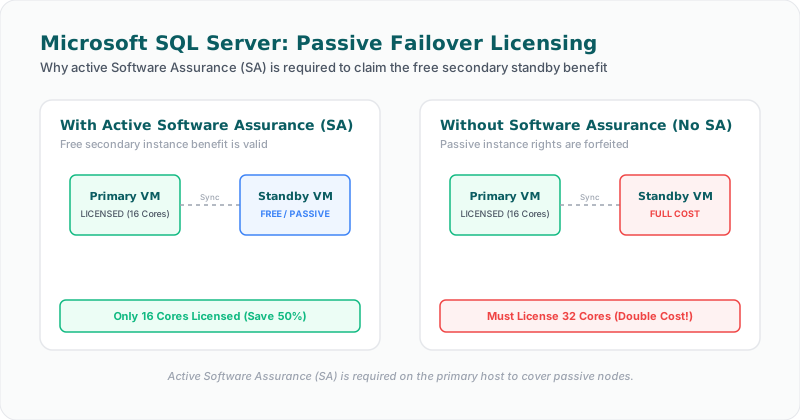
The Trap: Expiration Equals Non-Compliance
When you purchase SQL Server Per-Core licenses, you have the option to add Software Assurance (SA), which provides version upgrades, license mobility, and disaster recovery rights.
If your organization lets Software Assurance expire—perhaps to cut annual maintenance costs or because you decided to stick with a specific version of SQL Server—you immediately lose your passive failover rights.
From the moment SA expires, your passive standby node becomes fully licensable. During a Microsoft audit, this is treated as an unlicensed installation. Auditors will look back to the expiration date and demand retroactive licensing fees and penalties for the unlicensed secondary cores. For an Enterprise Edition cluster with 16 or 32 cores, this penalty can easily reach six figures.
What is a "Truly Passive" Instance?
To qualify for the free secondary instance benefit (when you do have active SA), Microsoft is extremely strict about the state of the secondary node. It must be truly passive.
A secondary instance is only considered passive if it is not serving data to clients or running active workloads. The only activities allowed on a passive node are:
* Database backups and log backups.
* Database consistency checks (DBCC CHECKDB).
* Data synchronization with the primary node.
If your secondary instance is performing read-only queries, generating reports, running analytical workloads, or being accessed by developers for testing, it is considered active. Once an instance is active, it must be fully licensed, regardless of whether it is a failover target.
Best Practices to Protect Your Budget
To avoid the passive failover trap, follow these three steps:
1. Audit Your SA Status: Regularly review your Microsoft licensing agreements to ensure that every primary SQL Server instance participating in a failover cluster (Always On Availability Groups, log shipping, or failover cluster instances) has active Software Assurance.
2. Monitor Secondary Workloads: Check your secondary instances to ensure they are not configured for readable secondaries. If your team is offloading reporting to a secondary Availability Group node, ensure that node is fully licensed.
3. Align Core Counts: The passive failover benefit only covers a secondary instance with compute capacity equal to or less than the primary instance. If your DR node has more cores than the primary node, the extra cores must be licensed.
Don't let a maintenance contract renewal oversight lead to a compliance penalty. Keep your Software Assurance active, or ensure your DR nodes are fully licensed.
Facing an active Oracle or SQL Server Audit?
Verify database parameters and virtualization host boundaries locally without raw data uploads. Download our secure gateway.